
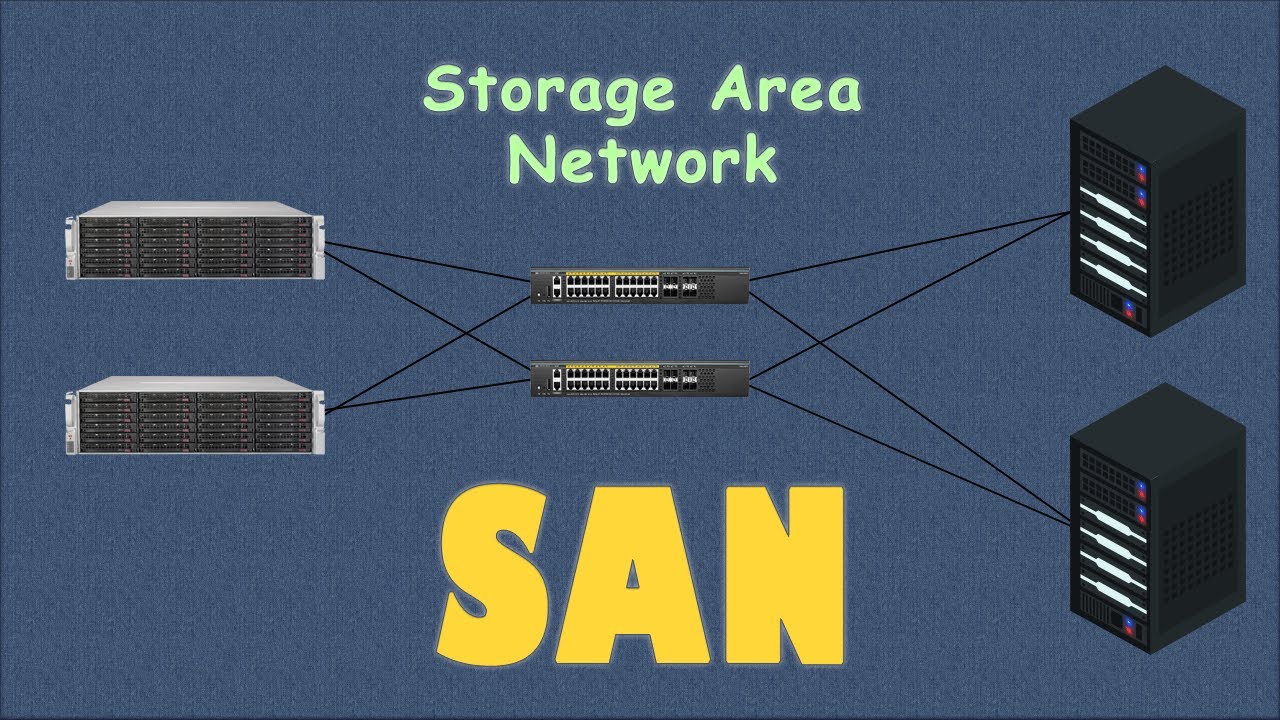
High availability keeps businesses running today. It ensures your data remains accessible even when hardware fails. A Storage Area Network or SAN provides the backbone for this reliability. It moves data off individual servers into a centralized pool. This setup creates a resilient environment for your digital assets. You never have to worry about a single disk crash destroying your work. SAN technology uses smart features to protect your information around the clock. These tools work together to prevent downtime and data loss.
This article explores nine essential SAN features that boost data availability. Understanding these tools helps you build a stronger IT infrastructure. You will see how modern storage handles growth and unexpected errors easily. Let us dive into the world of seamless data access and protection.
1. Multiple Paths for Data Flow
Most systems fail because they have a single point of failure. A storage area network solves this using Multipath I/O, which allows data to travel through multiple paths, ensuring continuous access even if one connection fails. This feature creates several physical routes between the server and the storage.
If one cable or switch breaks, the data simply takes another path. Your applications stay online without any interruption. This constant flow keeps your business productive during hardware repairs.
Reliability starts with redundancy in the physical layer. Once you secure the path, you can focus on how the data sits on the disks.
2. Smart Disk Organization with RAID
“RAID” is the abbreviation for Redundant Array of Independent Disks. It is a technology that combines several discrete “physical” drives into a logical “non-physical” unit. This feature protects your data if a specific drive dies. The system uses parity bits to rebuild lost information on the fly. You get to choose different levels based on your speed and safety needs.
Designing for Failure Resistance
Modern SANs manage RAID automatically to save you time. They monitor drive health and move data before a crash happens. This proactive approach keeps your volumes healthy and accessible.
Choosing the right disk setup leads directly to how you handle point-in-time recovery.
3. Instant Snapshots for Quick Recovery
Snapshots act like a digital camera for your data. They capture the state of a volume at a specific moment. You can roll back to this version if a virus or human error occurs. Unlike traditional backups, snapshots happen almost instantly. They do not slow down your primary systems while they run.
These quick copies provide a safety net, but you also need to move data across distances.
4. Distance Protection with Remote Replication
Replication sends your data to a second Storage area network in a different building. This protects you against fires, floods, or power outages at your main site. You can choose synchronous or asynchronous modes. Synchronous mode writes to both sites at the exact same time. Asynchronous mode sends data updates at scheduled intervals.
Keeping data safe in two places is great, but you must also manage how servers see that data.
With more businesses now using storage as a workaround, its market is continuously growing. The total market share is expected to surpass $24.66 billion in 2026.
5. Better Organization through LUN Masking
LUN Masking acts like a security guard for your storage. It ensures only specific servers see certain storage portions. This prevents different servers from overwriting each other. It creates a clean and organized environment for your data. This isolation stops accidental data corruption across the network.
Organized storage stays available longer because it avoids human mistakes. This leads us to how we handle growing data needs.
6. Flexible Growth with Thin Provisioning
Thin provisioning lets you allocate more storage than you actually have. The SAN only uses physical space when you actually write data. This prevents “stranded capacity” where space sits empty and useless. It allows your systems to stay online as you add more physical disks later. You never have to shut down to resize a volume.
Efficiency matters for uptime, but you also need to find the data quickly.
7. Intelligent Data Tiering
Not all data has the same value. Tiering moves your most important files to fast SSD drives. It moves older files to cheaper and slower hard drives. The SAN does this move automatically based on how often you use the file. This ensures your critical apps always have the fastest access possible.
Speed keeps systems responsive and available under heavy loads. High-speed access relies on a clean network fabric.
8. Fabric Zoning for Traffic Control
Zoning divides your SAN into smaller private clouds. It limits communication between specific ports on the network. This prevents a “noisy neighbor” from slowing down the whole system. It also stops unauthorized devices from seeing your sensitive data. A quiet and secure network is a highly available network.
Control over the network prevents crashes, but hardware still needs updates sometimes.
9. Non-Disruptive Upgrades and Patches
Old storage required downtime for every update. Modern SANs allow you to swap parts while the power is on. You can replace fans, power supplies, and controllers without stopping the data flow. The software also updates in the background. Your users never notice that maintenance is happening.
Conclusion
Data availability is the heartbeat of your company. Using these nine Storage area network features builds a fortress around your information. You get protection from hardware breaks and human errors. Your systems stay fast and grow with your needs. Investing in these tools means you can sleep better at night. Your data will be there when you wake up tomorrow. High availability is no longer a luxury for big banks. It is a basic requirement for every modern team. Start using these features today to keep your business moving forward.